Website hosting and domains are the two essentials that decide whether your site loads fast, stays online, and earns trust—before design or content even has a chance to work.
In the UAE, a smart setup also means choosing the right domain extension, connecting DNS correctly, and securing everything with SSL so your visitors see HTTPS from day one.
This guide breaks the stack down into clear steps, helps you avoid costly downtime, and gives you a practical checklist you can apply immediately—without technical overwhelm.
Contact Lucidly on WhatsApp for a focused hosting, domains, and SSL review—so you can spot DNS, security, and performance gaps before they cause downtime or lost leads.
The three building blocks of website hosting and domains
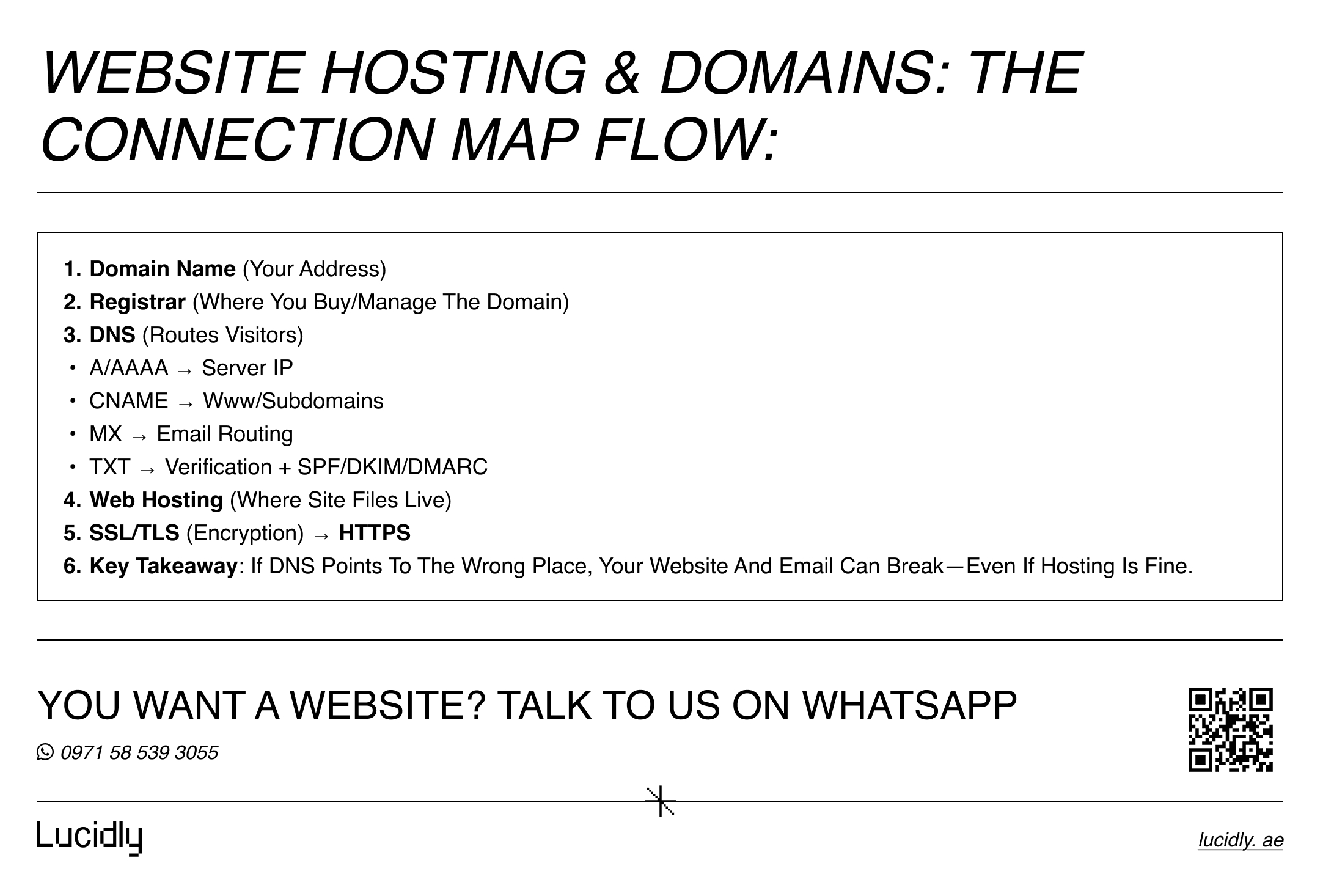
Most website problems come from mixing up responsibilities. Before you buy anything, it helps to see how the parts fit together and what each one controls—website hosting and domains.
Domains: your address on the internet
A domain is the name people type to reach you (for example, yourbrand.com or yourbrand.ae).
When someone enters your domain, the internet needs to know where to send them. That “routing” happens through DNS (Domain Name System), which your registrar or DNS provider manages.
In the UAE, choosing between .ae domain registration and a .com is often a strategic decision. A .com is globally familiar; a .ae domain can signal local presence and relevance for UAE-first customers.
Hosting: where your website lives
Hosting is the service that stores your website files and serves them to visitors. Your hosting plan affects speed, uptime, scalability, and how easily you can manage updates, backups, and security.
For UAE audiences, the key is consistent performance for visitors in Dubai, Abu Dhabi, Sharjah, and beyond—especially on mobile.
If you’ve ever experienced a site that loads slowly, times out, or crashes during a campaign, it’s usually a hosting and configuration issue—not “just the website.”
SSL: the security layer that enables HTTPS
An SSL certificate (more accurately, TLS) encrypts data between the visitor and your server and enables HTTPS. Even if you don’t process payments, HTTPS matters for trust, browser warnings, and modern security expectations.
It also prevents many “in-between” attacks on public networks and helps protect login sessions.
.ae domains in the UAE: when to choose them and how to register correctly
Your domain choice affects branding, trust, and long-term control. It’s also one of the easiest places to make an expensive mistake—because a domain is a renewable asset that can be lost if it’s not managed properly.
.ae vs .com: a practical decision framework
Choose a .ae domain when:
Most of your customers are in the UAE.
You want a strong local signal for brand credibility.
Your marketing targets UAE-specific search intent.
Choose .com when:
You operate across multiple countries.
Your brand already exists globally.
Your audience is equally international.
Many UAE businesses secure both (brand protection) and redirect one to the primary domain. That approach can reduce confusion and prevent competitors from registering a lookalike name later.
Domain registration essentials: ownership, renewals, and transfer safety
Whether you register a .ae or .com, the goal is the same: maintain clean ownership and prevent loss as part of strong website hosting and domains management.
Here’s the minimum standard for safe domain management:
Use a reputable registrar and keep all invoices and admin access documented.
Enable auto-renew and ensure payment methods won’t expire silently.
Turn on two-factor authentication (2FA) for registrar access.
Enable domain lock to prevent unauthorized transfers.
Keep registrant/admin contact details current so you receive renewal and security alerts.
A surprising number of business outages begin with an expired domain—not a server failure.
learn more about: technical web development infrastructure.
DNS made simple for website hosting and domains (and why changes feel “random”)
DNS is the bridge between your domain and your hosting. When it’s correct, everything “just works.” When it’s wrong, the symptoms can look confusing: the site loads for some people but not others, email suddenly stops, or changes appear hours later.
Nameservers vs DNS records: what you’re really changing
There are two common ways to connect a domain to your web hosting services in website hosting and domains:
Change nameservers
You point the domain to a DNS provider (often your host). From that point, you manage all DNS records there.Keep nameservers and edit DNS records
You keep DNS where it is (at the registrar, Cloudflare, or a DNS provider) and set records manually.
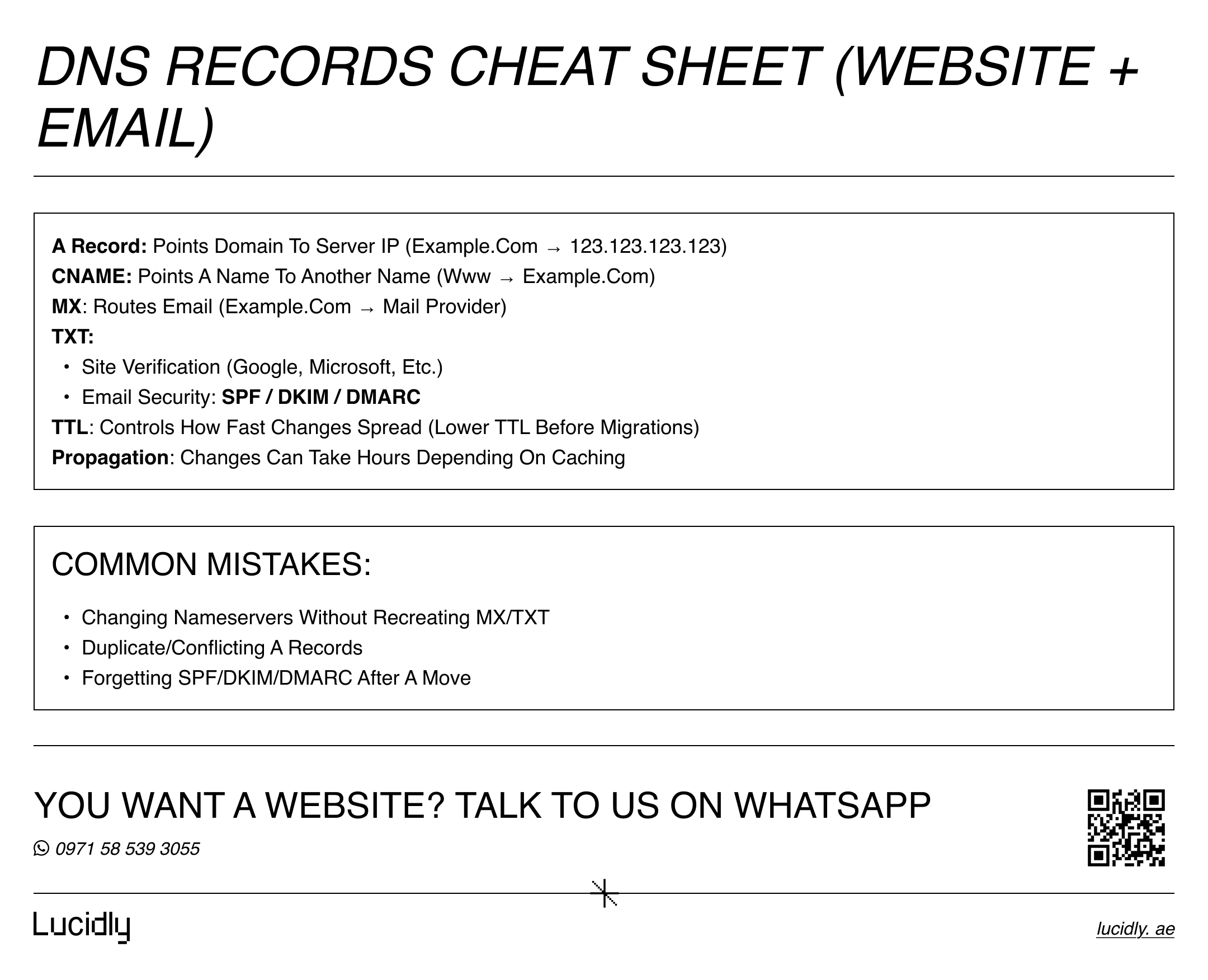
The most common records you’ll see:
A record: points your domain to an IPv4 address (your server).
AAAA record: points to an IPv6 address (less common, but growing).
CNAME: points a subdomain to another domain (useful for “www”).
MX: routes email to your mail provider.
TXT: verification and email security settings (SPF/DKIM/DMARC).
If you use business email hosting, your MX and TXT records are as important as your website records.
DNS propagation: why it takes time
DNS changes don’t update instantly everywhere. Providers cache results for performance, and your previous settings may remain visible until caches refresh. That delay is called DNS propagation.
If you’ve changed DNS and the site “half works,” check:
You updated the correct DNS zone (right provider).
The A/CNAME records match your host’s instructions.
Old records aren’t conflicting (especially duplicate A records).
Your TTL (time to live) isn’t set too high for a migration.
You’re not viewing cached results (try a private window or different network).
A clean DNS record inventory—saved before changes—makes troubleshooting dramatically faster for website hosting and domains.
Email and DNS: the migration trap
Moving a website to a new host does not always mean moving email. If you change nameservers to your new host without recreating email DNS records (MX/TXT), your email can break.
Before any DNS switch:
Export your current DNS records.
Confirm where email is hosted.
Recreate MX, SPF, DKIM, and DMARC records exactly.
Test email delivery after the change.
For many companies, email downtime is more damaging than website downtime.
read our guide about “server-level speed optimization” and learn how website performance can affect conversions.
Choosing hosting in the UAE for website hosting and domains: speed, support, and reliability
Hosting isn’t about buying “the biggest plan.” It’s about matching your business needs to the right architecture so your site stays fast and stable as traffic grows—especially when website hosting and domains are already set up correctly.
Hosting types: what to choose and when
Different hosting models solve different problems. This quick comparison is enough for most decisions:
Shared hosting works when:
You’re launching a small brochure site.
Traffic is low and stable.
Budget is tight and performance expectations are modest.
VPS hosting (Virtual Private Server) works when:
You need more control and consistent resources.
You run WordPress with multiple plugins or a growing catalog.
You want better performance without dedicated server costs.
Dedicated hosting works when:
You need maximum performance and control.
You run heavy applications or strict environments.
You can manage server administration (or hire support).
Cloud hosting works when:
Traffic spikes are expected (campaigns, seasonality).
You need scalability and redundancy.
You want modern infrastructure flexibility.
A common UAE reality: many “slow site” complaints come from a shared plan running a complex WordPress build with large images, multiple tracking scripts, and heavy page builders. The site isn’t broken—it’s underpowered.
Managed hosting: when it pays for itself
Managed hosting Dubai (or managed hosting in the UAE) is less about location and more about responsibility. With managed hosting, the provider handles or assists with:
Server updates and hardening
Backups and restore points
Malware scanning and protection
Performance tuning and caching
Monitoring and rapid response support
It’s ideal for businesses that want growth without turning hosting into an internal IT project—especially ecommerce, lead-generation sites, and brands running frequent promotions.
Local data center vs international hosting: what matters most
If most of your customers are in the UAE, latency can become noticeable—especially on mobile networks.
Hosting closer to your audience often improves response time and user experience. That said, the “best” choice is a balance for website hosting and domains decisions:
Prioritize:
Reliable uptime and a clear SLA
Strong support that answers quickly
Performance features (caching, CDN, modern PHP/runtime options)
Secure infrastructure and backup policies
Server location matters, but bad support and weak infrastructure matter more.
Ready to Build a High-Performance Website?
Turn strategy into results with Lucidly’s custom web development solutions — built for speed, SEO, and business growth.
👉 Book Your Web Development Consultation
SSL and HTTPS: the security foundation after hosting and domains
Once your domain points to your host, the next step is to secure traffic properly for website hosting and domains. A site can be live and still be “unsafe” in the eyes of browsers if HTTPS isn’t configured correctly.
What SSL/TLS actually does
SSL/TLS encrypts traffic between a visitor and your server. It helps protect:
Login sessions
Form submissions and contact details
Customer data moving across networks
Admin access for your team
data encryption and SSL security does not replace good security practices like strong passwords, updates, firewalls, and backups—but it is non-negotiable for modern websites.
DV vs OV vs EV certificates: which one to pick
SSL certificates come in different validation levels:
DV (Domain Validation): confirms control of the domain. Fast, widely used, often free via Let’s Encrypt. Great for most marketing sites and many business sites.
OV (Organization Validation): includes organization verification. Useful for businesses that want stronger identity signals.
EV (Extended Validation): deeper verification. The browser UI has changed over the years, but EV can still matter for some enterprise trust policies.
For many UAE SMEs, DV is enough if everything else is well-managed: clean HTTPS, secure hosting, and good operational controls.
Free SSL vs paid SSL: the real difference
Let’s Encrypt provides free DV certificates and is widely supported through cPanel, modern hosts, and automation tools. Paid certificates may be preferred when you need:
OV/EV validation.
Enterprise support and warranty terms.
Specific compliance or procurement requirements.
Centralized certificate management across many domains.
The “right” choice depends on business needs, not status. What matters most is renewal reliability and correct configuration.
Installation and verification checklist (the step most sites miss)
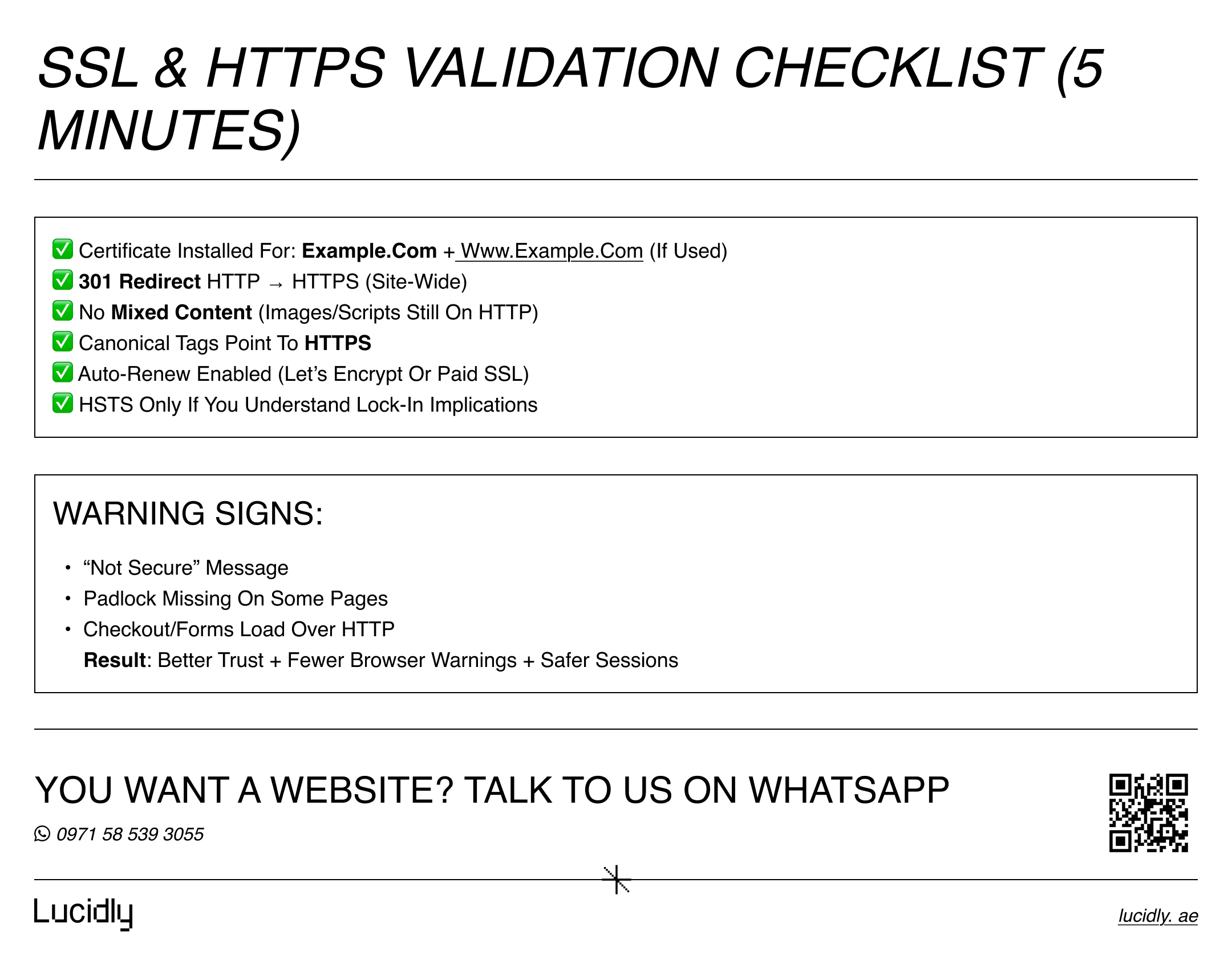
After installing SSL, verify the full chain, not just the certificate for website hosting and domains:
Force HTTPS across all pages (301 redirects).
Ensure the primary domain (with or without www) is consistent.
Fix mixed content (images/scripts loading over HTTP).
Update canonical tags and internal links to HTTPS.
Confirm HSTS only if you understand the implications.
A site that “has SSL” but still serves parts of a page over HTTP can trigger warnings and degrade trust.
Step-by-step UAE setup checklist
This sequence prevents the most common migration and launch failures. Follow it in order and document each step.
Before you start, decide your primary domain (e.g., brand.ae or brand.com) and where email will be hosted.
Register the domain Choose a strong brand name and secure variants if needed. Enable auto-renew and 2FA immediately.
Choose the hosting plan Match the plan to your site type and expected traffic. For WordPress, confirm PHP versions, caching support, and staging.
Prepare DNS records Export current DNS (even if it’s a new domain, start a record log).Plan A/CNAME records for the website and MX/TXT for email.
Connect domain to hosting Either change nameservers to your DNS provider/host or edit records manually. Keep notes of what you changed and when.
Install SSL and enforce HTTPS Use Let’s Encrypt or a paid certificate. Redirect HTTP to HTTPS and verify no mixed content remains.
Set up email safely Add MX records and email security (SPF/DKIM/DMARC).Test send/receive after DNS changes.
Enable backups and monitoring Daily backups plus offsite copies if possible. Uptime monitoring and alerting to catch issues before customers do.
Lock down admin access Strong passwords, 2FA, least privilege. Update software regularly and remove unused plugins/themes.
choosing the right stack also matters, learn more about tech stack compatibility.
Common problems and fast fixes
Even well-built sites can fail during changes.
When something breaks, narrow it down to where the failure can logically exist: domain, DNS, hosting, or SSL—because with website hosting and domains, a small change in one layer can affect everything.
“My website is down after a DNS change”
Start with the basics:
Confirm the domain is active and not expired.
Check nameservers match the intended DNS provider.
Verify the A record points to the correct server IP.
Ensure there aren’t duplicate conflicting records.
Wait for propagation if you changed DNS recently.
If only some users can’t access the site, caching and propagation are likely involved.
“My site says Not Secure”
Common causes:
SSL certificate not installed for the correct hostname (www vs non-www).
HTTPS redirects missing or misconfigured.
Mixed content (HTTP images/scripts).
Certificate expired or renewal automation failed.
Fix redirects first, then hunt mixed content, then re-check certificate coverage.
“Email stopped after moving hosting”
This usually happens when:
Nameservers changed and email DNS records weren’t recreated.
MX records point to an old provider.
SPF/DKIM/DMARC records were lost during migration.
Restore MX and TXT records exactly, then test with a few providers (Gmail/Outlook) to confirm deliverability.
FAQs
What’s the difference between a domain and hosting?
A domain is your website’s address, while hosting is the server that stores and delivers your website files. You can buy them from the same provider or separately. The domain uses DNS to point visitors to your hosting. Keeping them separate can improve flexibility; keeping them together can simplify support—choose based on who will manage it.
Do I need a .ae domain to do business in the UAE?
Not always. Many UAE businesses succeed with .com. A .ae domain can strengthen local relevance and trust, especially if your marketing targets UAE customers. If budget allows, registering both .ae and .com is smart brand protection, then redirect one to the other to avoid split traffic.
How do I connect my domain to my hosting?
You either change the domain’s nameservers to your hosting/DNS provider or keep current nameservers and create DNS records (A/CNAME) that point to your server. The correct method depends on where you want DNS managed. Always record your previous DNS settings before changes.
What is DNS propagation and how long does it take?
Propagation is the time it takes for DNS changes to spread through global caches. Some users may see the new site quickly while others still reach the old destination. Timing depends on TTL settings and caching behavior. If it’s urgent, reduce TTL before a planned migration and avoid repeated edits.
Which hosting type should I choose: shared, VPS, or cloud?
Shared hosting is fine for small sites with low traffic. VPS suits growing business sites that need consistent resources. Cloud is best when you expect spikes or want scalability. If your site is mission-critical, consider managed hosting so updates, backups, and security are handled reliably.
Keep ownership clear and track changes: secure your domain renewals, choose the right hosting, manage DNS carefully, then enable SSL and force HTTPS for website hosting and domains.
For most UAE SMEs: pick one primary domain, use reliable hosting and DNS, and automate renewals and backups—so your site stays online and trusted.
Contact us — or message Lucidly on WhatsApp for a focused website hosting and domains review—so you can identify DNS, SSL, speed, and security gaps before they cause downtime or lost leads.
References
TDRA / .aeDA — Accredited Registrars (official list)
UAE Government Portal (u.ae) — The top-level domain name of the UAE (.ae) + .aeDA role
TDRA / .aeDA — About the national .ae / .امارات domains (official overview)
Let’s Encrypt — Official site (free, automated TLS certificates)