Modern websites are targets—whether you’re a startup, an eCommerce store, or a local business site. The reason is simple: automated attacks scan the web 24/7 looking for weak passwords, outdated plugins, exposed admin pages, and misconfigured servers.
The good news? Most breaches happen because of a few common gaps—and most of them are fixable with a clear, repeatable security routine.
This guide breaks down the threats that matter, what “website security” really includes, and the essentials you need to protect your site from hacks and data loss.
Message Lucidly on WhatsApp to audit your website security and prevent costly data loss.
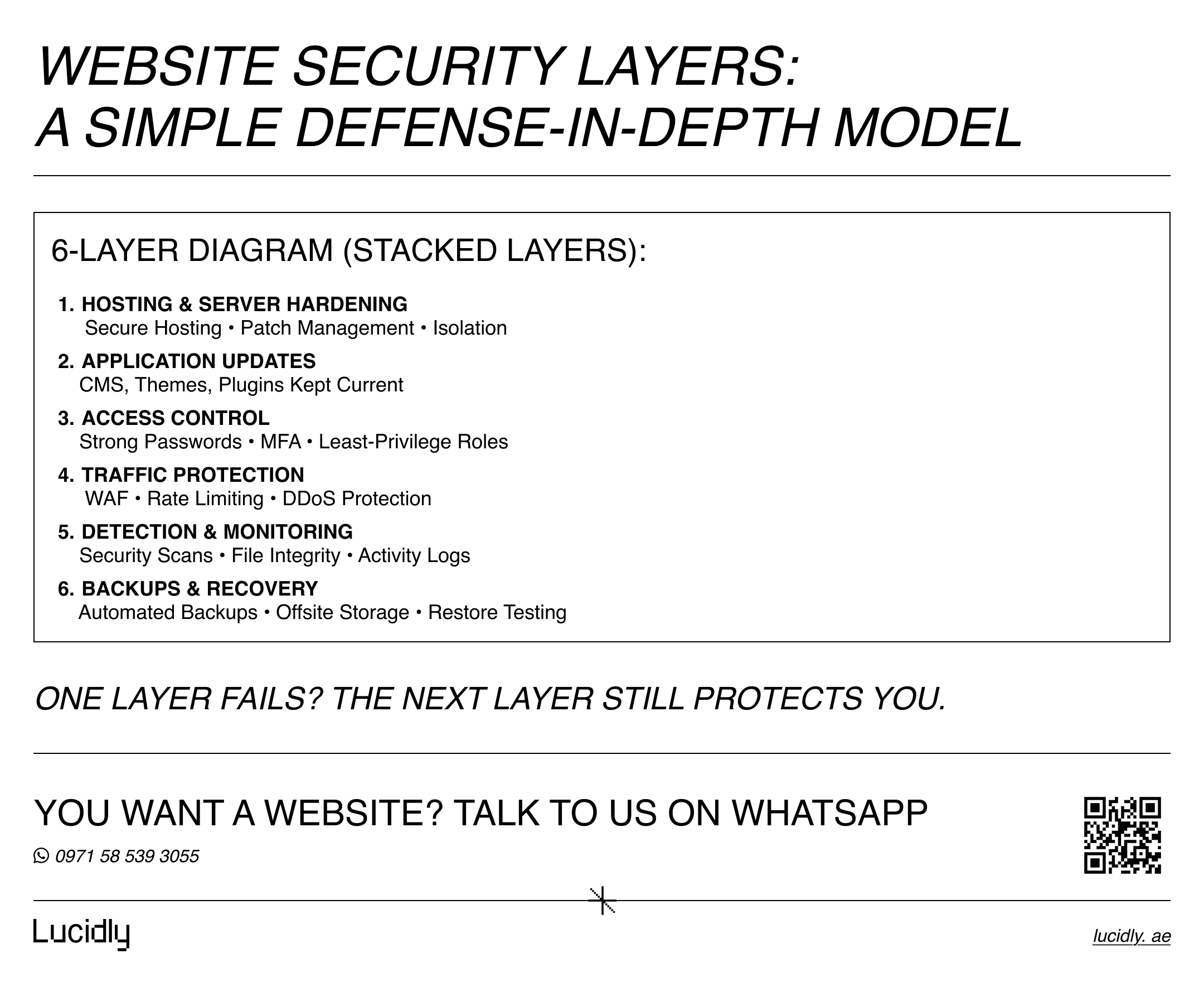
What Website Security Actually Means
Website security is the set of practices and tools that keep your website:
Private (protecting user and business data)
Available (stopping downtime from attacks)
Trusted (preventing malware warnings and reputation damage)
Recoverable (ensuring you can restore quickly if something goes wrong)
It covers more than just “installing SSL.” Real security includes your hosting environment, CMS, plugins/themes, databases, user accounts, and monitoring systems.
Website security starts with how your site is built. If you’re reviewing your foundation, this overview of professional web development for business websites explains how architecture, hosting, and code quality affect long-term stability and protection.
Why Hacks Usually Turn Into Data Loss
Data loss doesn’t only happen when a hacker “deletes” your files. It happens when attackers:
Steal customer records, form submissions, or payment-related data
Modify content (SEO spam, redirects, hidden pages, injected links)
Encrypt files (ransomware-style incidents)
Destroy databases or backups
Lock you out by changing admin credentials
The biggest multiplier is this: no reliable backups + late detection = expensive recovery.
Your platform also impacts security risk. If you’re deciding how to build or rebuild, this comparison of custom websites vs WordPress vs builders for business growth breaks down how each option affects control, updates, and vulnerability exposure.
The Most Common Website Security Threats (That Hit Real Businesses)
Most websites don’t get attacked by a “genius hacker.” They get hit by automated scripts and botnets testing thousands of sites per hour. The common threats include:
Malware infections (file injections, malicious scripts, SEO spam pages)
Brute-force attacks (bots guessing passwords on /wp-admin, /admin, etc.)
SQL injection (database attacks through insecure forms/queries)
Cross-site scripting (XSS) (injecting scripts that affect visitors or sessions)
Phishing and credential theft (stealing admin access via fake logins)
DDoS attacks (flooding traffic to take your site offline)
A lot of this comes down to three root causes: outdated software, weak access control, and poor server configuration.
Website Security Essentials Checklist (The Non-Negotiables)
If you only do one thing from this article, do this checklist. These are the protections that prevent the majority of common attacks:
Update your CMS, themes, and plugins regularly
Outdated plugins are one of the most common entry points for attackers.Use strong passwords + Multi-Factor Authentication (MFA)
MFA alone blocks a huge percentage of credential-based attacks.Force HTTPS with a valid SSL certificate
Encrypts data and protects sessions, especially on logins and forms.Install a Web Application Firewall (WAF)
Helps block malicious requests before they reach your site.Run malware and vulnerability scans
Catch issues early—before Google warnings, redirects, or spam pages appear.Set automated backups (and test them)
Backups that can’t be restored are not backups.Limit user permissions
Give the minimum access needed—especially for editors, freelancers, and vendors.
Best Practices That Make Your Security “Hard to Break”
The checklist above is your foundation. These best practices add layers that make attacks harder, detection faster, and recovery smoother:
Limit login attempts and add rate limiting (bots hate this)
Change default admin URLs where possible (reduces automated targeting)
Disable unused plugins/themes (less surface area)
Use secure hosting with hardened server configs and proactive patching
Monitor file changes (unexpected changes = early warning sign)
Log user activity (so you can trace suspicious actions)
Secure forms (CAPTCHA + validation + spam protection)
Restrict admin access by IP, VPN, or additional authentication where feasible
Security is rarely one tool. It’s layers + routine.
Tools That Help (Without Overcomplicating Your Setup)
You don’t need 20 security plugins. You need the right mix for your stack:
WAF / CDN protection (blocks bots, DDoS, malicious requests)
Security plugin or scanner (malware detection, hardening, alerts)
Backup solution (scheduled backups + offsite storage)
Uptime and incident monitoring (know when something breaks fast)
The goal is simple: prevent, detect, recover.
How Often Should You Update and Audit Website Security?
Think of security like maintenance, not a one-time project.
Weekly: check updates, review alerts, confirm backups are running
Monthly: run full scans, review user access, clean up unused plugins
Quarterly: perform a deeper security audit + test recovery process
Immediately: apply critical patches as soon as they’re released
If your site handles payments, customer accounts, or sensitive forms, you’ll want more frequent monitoring.
Security only works when it’s ongoing. This guide to professional website maintenance and support services explains why updates, monitoring, and backups need to be part of your long-term operating routine—not a one-off task.
.jpg)
Website Security for Businesses in the UAE
Businesses in the UAE operate in a fast-moving digital market where trust and reliability matter. A compromised website can lead to:
customer data exposure
downtime during peak periods
brand reputation damage
lost leads and reduced conversions
costly cleanup and rebuild work
For UAE businesses, the practical approach is: secure hosting + routine updates + monitoring + backups + professional support when needed.
When It’s Time to Use Professional Website Security Services
DIY security works up to a point—until you need speed, expertise, and clear incident handling. Professional website security services typically include:
Website security audit (technical review + vulnerabilities)
Malware removal and cleanup
Firewall and DDoS protection setup
Ongoing monitoring and alerts
Hardening and access control
Backup and recovery planning
Incident response if a breach happens
If your website is a revenue channel, security isn’t overhead—it’s protection for growth.
Ready to Build a High-Performance Website?
Turn strategy into results with Lucidly’s custom web development solutions — built for speed, SEO, and business growth.
👉 Book Your Web Development Consultation
FAQ
What is website security?
Website security is the process of protecting your website, data, and users from cyber threats, unauthorized access, and downtime.
How do I protect my website from hackers?
Keep everything updated, enforce strong authentication (MFA), use a WAF, scan regularly, and maintain tested backups.
Is SSL enough to secure a website?
No. SSL is essential, but it’s only one layer. You still need updates, firewall protection, scanning, access control, and backups.
Do small business websites need security?
Yes. Small sites are frequent targets because they often have weaker security controls and outdated plugins.
Most website hacks are preventable. The difference between a secure site and a vulnerable one is usually not “complex cybersecurity”—it’s consistent basics: updates, strong access control, firewalls, scanning, and backups you can restore.
Build the routine once, and your site becomes harder to attack, easier to monitor, and far easier to recover.
Contact us — or message Lucidly on WhatsApp for a clear website security + performance review—so you can prioritise the highest-impact fixes to prevent hacks, reduce risk, and protect your data before problems escalate.
References
Google Search Central – Website Security Guidelines
https://developers.google.com/search/docs/advanced/securityOWASP – Top 10 Web Application Security Risks
https://owasp.org/www-project-top-ten/Cloudflare Learning Center – Website Security & Protection
https://www.cloudflare.com/learning/security/